
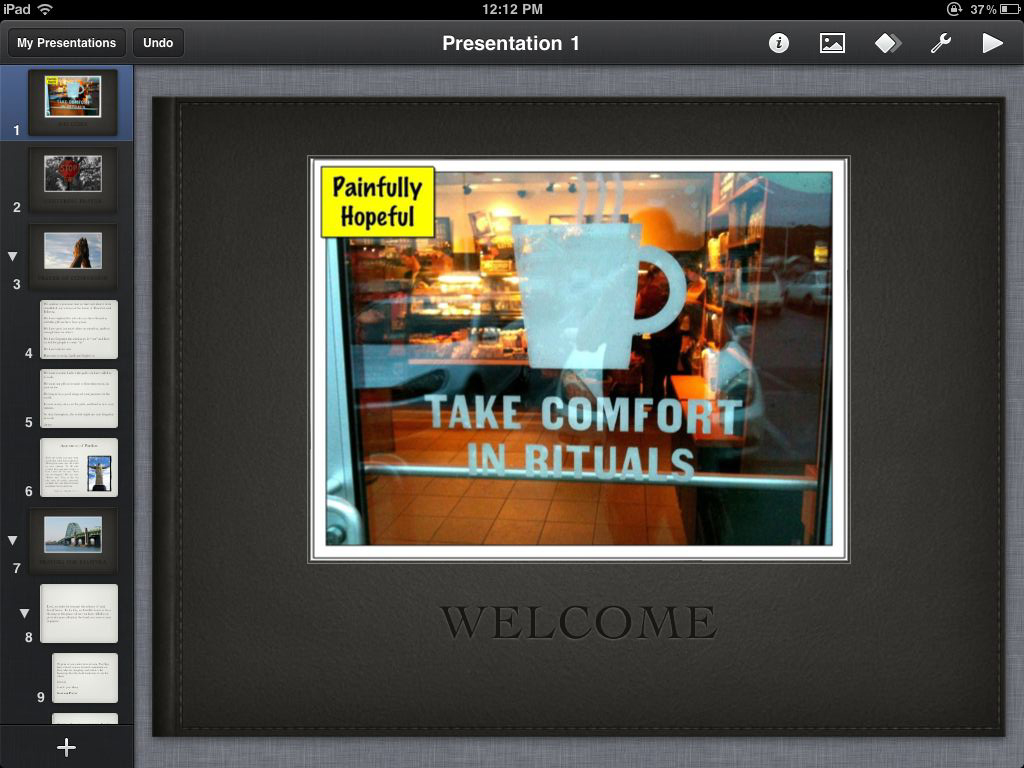
Last night, Central Baptist Church had a wonderful evening of prayer which sprang from a discussion we recently had on restructuring. It was, truly, a good beginning.
As I am, according to one of the members of our congregation (who happens to be a doctor), “The poster-child for ADD” I tend to avoid prayer meetings like the plague. This isn’t because I don’t want to pray with others, it’s because by the time the second person has started talking I’ve already mentally checked-out. Normally, I just begin reciting the Jesus Prayer to myself to keep from wandering too far. Even that, however, doesn’t prevent the stress of being cooped up in a room with people taking turns talking to God while I have to pretend I’m listening (and, no, repeating “yes Lord” over and over does not help). To make a prayer meeting accessible to myself, then, I typically cycle through a series of different forms of prayer, and frequently limit the amount of words a person can speak out loud when spoken prayer is called for (not only does this help me keep focus, it also cuts off the tendency for prayer meetings to devolve into prayer wars, with people looking to pray to get the greatest chorus of “yes Lord”).
I am also a visual-thinker, so I like to lead people through the progression of prayer by displaying images and text for people to follow along. This is good to do in a room where the fluorescent lights are sucking people’s brains out through their eyeballs.
I am also a geek, so I thought that a prayer-meeting would be a wonderful time to test developing some slides entirely on my iPad using Keynote. Here’s my experience.
Slide Development
Developing slides on Keynote was “OK.” The touch interface is good for moving objects around, and the built-in templates are beautiful. I do, however, have some problems using iOS Keynote to develop slides:
- You can’t alter the template. You pick it, you use it. End of line. You can’t set up your own templates, nor can you change the background of a slide in your template. It’s like the MCP has everything locked down.
- Slide Transitions. On the desktop, I can create a master slide for a template, and set it for a specific transition (page flips for Scripture readings, etc.). I can’t find a way to do that on iOS Keynote, nor have I figured out a way to set a slide transition on more than one slide at a time.
- Accessing images is a pain. I really wish Apple would just get cloud storage for images and whatnot done already. I’d love to be able to access my iPhoto library on my iPad without having to sync. As it stands now, the only way I can get my images on the device is to copy them into dropbox through my macbook or set up a sync through iTunes. This pretty much defeats the purpose. Also – Carbonite, if you’re listening, being able to save my files which are backed up via your service on to my iPad would be really nice. OK?
Presenting
Presenting through the iPad was a very nice experience, but was it “magical?” Here’s my thoughts on this.
- The dual-screen features for Keynote on the iPad are good, but not perfect. I can mirror the projector, show the next slide, show the current and next slide, or show the current slide and notes. It’s a good selection, but why on Earth can’t I show the current slide, the next slide, and also my notes? There’s room for this, it should be an option.
- Switching slides also needs more feedback. Right now if you tap the slide changes with no indicator on the iPad whatsoever. If I swipe, however, I get an arrow showing me something is progressing. The problem is, while the arrow direction makes logical sense (it points right when you advance and left when you go back), it feels backwards. This is because I’m used to using my iPhone to control presentations – on both the Wooji Presentation Remote (my favorite, by the way) and Apple’s Keynote Remote when you advance the slides or notes move in from the right. When you go back they move in from the left. iOS Keynote needs to implement something similar because it’s move visually intuitive.
- The speed is amazing. There were times where I wasn’t hitting the “sweet spot” for swiping or tapping and I couldn’t advance the slide – when I figured out the process, however, the transitions were fast. New notes and the slide-preview showed up right along with the projected slide on the screen (there is more of a delay when controlling a presentation from my iPhone).
- Switching apps is wonderful. At one point I wanted to switch to Evernote so I could jot down what people were saying regarding Central. Specifically, what we’re doing, planning on doing, and feel called to do. It “just worked,” and people were able to see my list as I made it. In the future, I can see how this would be useful for doing a group brain-storming session with a mind-mapping app. Getting back to the presentation was fast, and it came up in the same state I left it in (multi-tasking in action, I’m glad it works correctly).
- I hate being tethered. I love begin able to walk around while I present. While that would have been stupid in the context of a prayer-meeting, I can see how limiting being tied to a VGA cable would feel when lecturing or preaching. I really want to see mirroring, or at least Keynote presenting, enabled via airplay. A projector with airplay built-in, would be a killer app.
Initial Conclusions
Is using Keynote to present live “magical?” I’m not quite ready to go that far. It’s certainly “magic-ish,” but the continued presence of the physical tether, the lame indicators when advancing slides, and the weird over-sight that doesn’t allow you to put notes up on the “Current and Next slide” view gets in the way.
I’ve also had problems importing presentations into Keynote in the past, which would make me hesitant to use this frequently for presentations. Here’s my gripes.
- Getting presentations into Keynote is a bear, and when you import it, there’s not way to keep changes in sync with the version you imported from. This is a pain when I import from DropBox, for example.
- There needs to be a way to embed a font in a presentation, or add fonts to the app so presentations can be displayed correctly. Yes, fonts should be kept as simple a possible, but when I import a presentation from an other platform, I don’t want to be limited to what Apple says “simple” is. An app like Strip Designer will allow you to add fonts, why on earth can’t Keynote?
- Embedded videos don’t play in my imported Keynotes. I’m going to put this through some paces, but no embedded video has be able to play when I present my slideshow. I’m not sure if this is because the videos will only output to an external screen (they do display like they should play), but it’s a big annoyance. Also, Apple must open up the codecs supported on the iPad. I don’t expect them to open the flood-gates and get every obscure or geek-loved codec available, but even wider support for Apple’s beloved h.264 would be a big step up. My Kodak Play Sport video camera, for example, takes video with h.264 and AAC as the audio – the video simply cannot be imported into the iPad! This is a pain because I was really looking forward editing some video in iMovie on the iPad. It should work, as the specs are correct, but Apple has it locked down so tight it doesn’t work. I don’t want to be making a presentation and find my media is unusable with no ability to make it useable.
So there you have it. Presenting with iOS Keynote is a very good tool (I do love that it just gets out of the way), but it’s not a great tool. I have sincere hopes that it will become a great tool. But until then, my Macbook will continue to be present when I’m presenting.
Discover more from Painfully Hopeful
Subscribe to get the latest posts sent to your email.
